

Your matter. Within reach.
A secure place for the messages, documents and details that keep you connected to your lawyer.
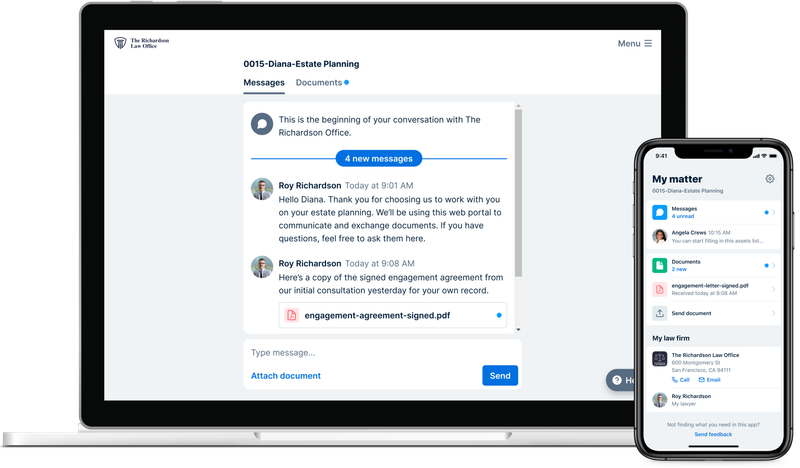
Messages
A direct, secure conversation.
Documents
The details, together in one place.
Calendar
Important events for your matter.
Invoices
A clear view of your account.
A guide to the portal’s features. Your actual Clio workspace contains the information shared by your counsel.
A personal invitation.
A simpler connection.
Your lawyer sends the link you need to access your matter. There is no need to create a separate account on this website.
- 01
Look for your invitation.
Find the Clio for Clients email shared by your lawyer. Contact us if you need it sent again.
- 02
Sign in with your email.
Follow the invitation link and the instructions to access the information connected to your matter.
- 03
Stay in the conversation.
Read messages, share documents and review the invoices and events your counsel makes available.
A little help
getting connected.
Find an answer here, or get in touch with the office.
More about Clio for ClientsHow do I sign in?
Your lawyer sends a personal Clio for Clients invitation link to the email address associated with your matter. Open that link and follow the sign-in instructions using your email address. If you cannot find the invitation, ask the office to help you regain access.
Can I use the portal on my phone?
Yes. Clio for Clients can be accessed through a browser or mobile device. The getting-started guide explains the available options.
Can I make a payment without opening the portal?
Yes. Existing clients can use the payment page to pay an invoice or deposit funds into trust. Choose the option that matches the request from your lawyer.
Who can help with access?
Email info@hcls.law or call (613) 519-4518. Let the office know you need help with your client portal invitation or account access.
Your next chapterstarts with a conversation.
You don’t need to have all the answers. Tell us where you are, and we’ll help you find a way forward.